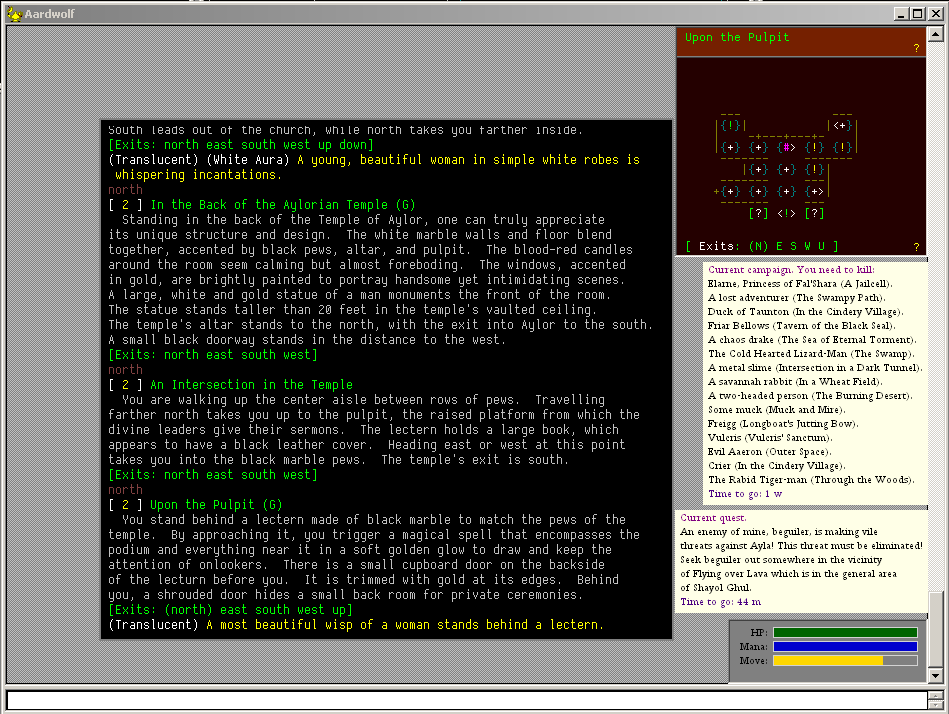
A configurable border, into which the text from the MUD goes - see:
The intention here is that you can push the ordinary text away from the window edge, making room for miniwindows along each side. My example only shows them on the right, but you can imagine extra ones on the top edge, bottom and left.
This would let you put something like quest objectives along the top, and some "action buttons" along the bottom, above where you type.
The ability to do minor blurring of images - see:
This lets you create nice effects for headings, also if doing a border in a window make a nice "drop shadow" to make it look more 3D.
You can generate random noise effects - see:
The intention here is to let you make texture effects, like desert or roads, if drawing maps, or making borders.
Blend images on top of each other, see:
There are a considerable number of blend modes, similar in operation to those available from image processing programs, such as Photoshop, the Gimp, and so on.
Blending lets you combine images with different effects, and/or different levels of opacity. For example, put some text at 20% opacity over a box.
Allow miniwindows become the source for drawing in other miniwindows. Since miniwindows don't have to be visible, they can be "workspaces" for preparing text or images, intended for blending or loading into other windows.
Draw colour gradients in a rectangle, see:
This would let you make status bars that start off green, and gradually become red, or be used for other special effects.
These changes are almost ready to release, they just need a bit more testing. I am sure that with a bit of imagination, MUD interaction will enter a whole new phase of player-friendliness and immersion. :)
> I am sure that with a bit of imagination, MUD interaction
> will enter a whole new phase of player-friendliness and
> immersion. :)
Yes sir it certainly will. We (Aardwolf) are very fortunate to have you working with us, but I hope all MUD owners realize there is nothing Aardwolf specific in any of this. The tools you are creating can pull the whole genre forward.
On the topic of moving the scrollbar - if it is done, I'd rather have it optional in a worldsetting. Why? Because I have atleast one crappy mousedriver that simulates scrolling down/up by moving the mouse to the right bottom/top edge of a control and clicking there. It's horrible coding, but nothing I can help - yet I'd like to retain my scrolling ability. And yes... I use the latest driver, and yes, I have emailed them, and no, they aren't replying. :(
It's nothing MUSH should 'fix', but it is nothing the end-user can help either. (Although, I can imagine some people liking to have the edge on the rightmost side.)
Do you have any plans to add the ability to move/attach the scrollbar to the MUD text output window itself?
No current plans, although I can understand why you might want to. :)
Basically all the changes have been made so far to the "client" portion of the output window, the scrollbar is in the non-client portion. It might be fiddly.
(1) Ok, so in the pic you posted above Nick, although the scroll bar on the right appears unattached to anything, it still scrolls the text in the output window (game play), correct?
(2) To check I understand correctly, if I create a miniwindow which echos tells from the mud, appending to it as they occur, I would not be able to scroll the contents of that miniwindow (in which case I'd be better sticking with a notepad window for that function)?
Again, have not had the time to test and find out for myself, so pls accept my apologies if the questions are stupid.
They are sensible questions and raise some design issues I hadn't fully thought through.
1. Yes, correct.
2. At present the miniwindows do not directly support scrolling text. However it would not be a huge technical challenge to draw something like chats in such a way that they could be scrolled. However I take your point that it might be strange to have the main window scroll bar further over than the chat window scrolling, whatever that is exactly.
Am I correct in saying that miniwindows can not be located outside an output window visually?
If so, as an idea, if a miniwindow requires an output window to 'sit' on, could a separate 'output-like' window be created, kind of like a dummy world output window except that it does nothing other than provide a place for a miniwindow to sit, which would solve the 'un-intuitiveness' of having the scrollbar always positioned to the far right border of the MUD output window regardless of where the miniwindows are ...and perhaps the separate 'dummy output' windows could be a way of providing scrollbars for miniwindows..
That is correct. Miniwindows are totally implemented by intercepting the output window drawing routine and drawing extra things above or below (or to the side of) the normal text.
The very thing I was trying to get away from was having to have additional windows, dummy or otherwise, that then need to be opened, moved, and otherwise manipulated.
I think we just need to think laterally a bit about the scroll bars. For example, instead of a big gap between the text and the scroll bar, have the big gap on the left, and leave the text on the right, near or adjacent to the scroll bars.
Then things like the map could fill the left-hand gap.
The separate chat windows could be on the left (I am sure scroll bars could be dummied up for them as part of the miniwindow), and indeed it might be more intuitive to have the chat windows on the left, above where you type your replies.
Then the main output window could really be a "battle log".
Just to make it simplier to use, without activating a separate notepad windows and complicating job with text slicing and aligning by a script, why not to allow users to create a textwindow in worldwindow? I mean, when I change a mud frame to lower size and make space for minimindow, I would like for eg show there all speech in game. Somebody is talking to me, maybe in fight on fast run (when there is a big chance to overlook it) and i want it to be shown in separate miniwindow. In colours or font effect, and nothing else. This is an eg but ther are few more reasons to allow users creating such only-text miniwindows. Or to integrate notepad with worldwindow to create it in way as miniwindow and display text, with enabled scrolling and autowrappping.
I honestly think waiting for the miniwindows feature to flesh out a bit more might be a good thing. The options the current framework gives are already very open, and when the features that are currently missing (think drag&drop, right mouseclicks and similar minor stuff) are finally implemented, all of that stuff would be scriptable with the functions already present.
Sure, it would not be as easy or simple for someone starting scripting, but once a framework is written for it by a practiced scripter as a support framework of sorts, if would be really easy for you to use - and give people the opportunity to adjust it if the particular implementation of the framework doesn't suit their tastes.
I think that with a support script you could have a scrolling text window right now. It would take a bit of work to get the scrollbar right, but once done, it would be something you could just call whenever you wanted. Effectively, it would be added, but purely script-side.
Creating a scripted scrolling text window is something that I'm working on. Displaying a set of text lines isn't difficult to do, but adding the scroll bar has been a bit difficult. Actually, I keep getting sidetracked on other things while trying to make a functional scroll bar, so it might actually be easier than I think. I just haven't done much work on it.
Maybe some tips, how to make scrolling so I'll try?
I'm requesting for making scrolled minitextwindows mainly because it work noticeable faster when coded as a part of MUSHclient than when scripted externarly in (eg.) PHP. Hmm.. To be honest, I'm lazy too ;)
I love my scripts look simple and work fast so I'm wondering of plans that minitextwindows will be added/text mechanism simplified/notepad integrated with worldwindow etc :> I just don't know what to do now: stay a little longer on old scripts waiting for new versions of mushclient or start to transfer my c# (sic!) toolbars to miniwindows.
Slightly offtopic, but I was wondering whether 4.36 would come out before the weekend? I have some scripting intentions and it would be lovely to have the ability to get the output-windowsize and such, to name one.
Is there a chance that it will be added an ability to get mouse x&y position on the screen (soon)? eg. in getinfo func. It's simple to code and will be very, very useful, even (or aspecially) with MouseDown and CancelMouseDown hotspot actions when coding window resizing/movement/scrolling.
Could it be possible to add a "WindowDestroy" function?
I may be anal. Having to loop over (in WindowList()) a temporary window that was used once to create an image and will never be used again irks me. My momma taught me to clean up after myself. :)
I can see some hesitation if plugin authors arbitrarily destroy any window (I made a bunch, I only need to keep this one, so let's destroy everything but that one!.... baaad).
I wonder, is it possible to configure the main world border yet with Mushclient 4.37? I've seen some screenshots, with the main window is not taking the whole space, but can't find any documentation about it.
I was first think if it's possible to set the "Text offset from edge" to bigger than 20 pixels. I'm just used to having a map on the left hand side of the screen, and navigating my way by looking at the map, rather than reading exits word.
For now, I simply create a trigger to capture every single line, then send it back with some spaces appended in front of each line. It's a bit messy though. :)
Actually, TextRectangle is different. TextRectangle sets a rectangle in which the text is placed. The Text Offset applies even within that rectangle. You can see this best if you configure a coloured border around the textrectangle.