I'm not sure why, but it takes an abnormal amount of time to open World Properties.
It takes about 7 seconds to open World Properties. I just closed MUSHclient and re-opened it, and it still takes that long. My computer isn't slow or anything. It has a gig of RAM, 2.66 GHz, etc. I don't think it should take this long to open. Any world will take this long to open. Any ideas why?
Most of the world property windows use "lazy opening" - that is, the particular page doesn't load all its stuff until you switch to it. For example, the triggers list, I think, doesn't load up until you view triggers.
I will take a look at what gets loaded up anyway (before the window displays) to see if I can spot something. About the only thing I can think of offhand that might take a few seconds is IP address resolution, which I don't think it even attempts to do.
Failing that I will try to make a version that shows on the status line which page it is loading (the values for), so you can try to see where the problem is.
You could put that line into the Lua sandbox, or just execute it from the command line.
Then try opening the config. A whole heap of messages should flash by on the status line (too fast to read in my case). However if one sits there for a few seconds, please tell me what it is.
Right. While that text is being shown, the World Properties is not yet loaded. Then once it loads about 7 seconds later, the status bar changes to Ready.
The delay appears to be somewhere in the bowels of MFC, which makes it hard to find. I am wondering why it only seems to happen to you, unless everyone is getting a 7-second delay and thinks that is normal somehow.
My current guesses are:
Something to do with multiple CPUs. The delay I get sometimes on closing the configuration dialog occurs on my newer PC, which is a PC with 2 CPUs. I never get it on my single-CPU PC.
Something to do with the new Internationalization stuff (boy that word is hard to type!). Try an earlier version that didn't have it (eg. 4.02 or something). Maybe reading the resource file DLL is slowing it down.
A virus-checker is checking access to the EN.DLL file. Try turning virus checking off for a minute and seeing if that helps.
You have installed a debugger that is intercepting some debugging internal messages perhaps. Have you installed anything just prior to this problem happening?
Is there something else a bit non-standard? Like, using multiple monitors?
How would I install an older version without overwriting the current MC registry?
Turning off my virus detector didn't help.
This has been happening for a while. I can't think of any debuggers I installed. I normally keep my compilers (Visual Studio etc) on my laptop, and not this desktop.
Nope, normal desktop. One monitor. One core. 32bit. Etc.
I have created MUSHclient Live that you place in the same directory as the version that you want to run, it backs up ANY current MUSHclient settings, and runs from the settings that is located in the same folder, then upon closing it will restore the pre-existing settings, if any...
www.torasin.com/~venificius/MUSHclient_Live.exe
I posted this a while back so that you could run MUSHclient on a removable media of most kinds.
How would I install an older version without overwriting the current MC registry?
It shouldn't matter too much to revert to an earlier version. You could copy the entire MC directory to MC.bu or something like that, to keep everything, and then just do an install of an earlier version on top of the existing one. Then just copy the directory back when you have finished.
Do your install, test it, then rename the registry key back. Shouldn't really have to do that. Or use Regedit to export that key tree, and keep for later importing if necessary.
You got MUSHclient to compile yourself, right Zeno?
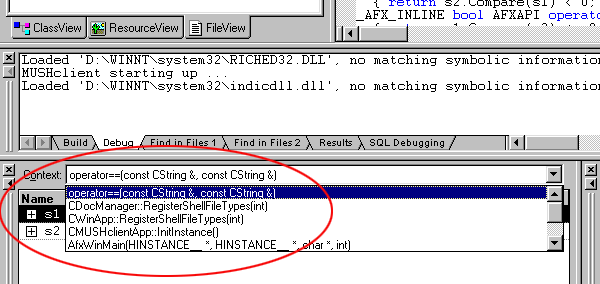
How about doing a compilation of a recent version (debug compile), then running in debug mode (I hit F5 to do that). Then when the big delay comes up, quickly switch back to Visual Studio and hit Break (Ctrl+Break I think). That should interrupt it, and you should be able to see where in the source the delay is.
Yeah, I don't see that. Maybe the newer versions renamed or removed it. I have the following windows/tabs open while debugging: Solution Explorer, Autos, Locals, Watch 1, Call Stack, Breakpoints, Command Window, Output and the main code window.
It may be Call Stack. But the only thing in that window is:
I was afraid you would get that. It looks like it is inside the NT Kernel somewhere. Sometimes I get that in the call stack when I interrupt the program.
I *think* you can run something that installs the Kernel debug symbols, it comes with the Visual C++. If you can hunt that down, it may give you the symbol names for those places in the Kernel, which may or may not help.
Unfortunately we aren't getting very far. It is hard to know the significance of what you are seeing, and why it only happens to you.