Out of curiousity, are there any DDE controls in MushClient, or is there another way to make it interact with other programs (self-written or DDE based) That I'm unaware of? Thanks!
Does MUSHclient use DDE?
Posted by Deqitosv on Sat 28 Jul 2001 08:50 PM — 18 posts, 73,075 views.
MUSHclient exposes an extensive list of interfaces via the COM method, which are documented at: MUSHclient functions
Now I just gotta figure out how to use this to my advantage in a VB-based external program. *lost and clueless* Thanks though!
If you initially call your program from MUSHclient, it can pass an "object reference" to your program. That program can then use that to do things to MUSHclient.
After a considerable amount of mucking about I got something like that to work. :)
Here is what I did:
The above steps have created a ActiveX file that can be called from MUSHclient.
Testing the ActiveX project
This is just an example program. However once you have it working you can expand it somewhat. For instance, you could store the "world" reference in a global variable and use it later on for other subroutine calls without having to pass it down every time.
After a considerable amount of mucking about I got something like that to work. :)
Here is what I did:
- Start Visual Basic
- Create a new ActiveX EXE project
- Under Properties change the class "(Name)" field from "Class1" to "MC_class"
- Under Properties change the project "(Name)" field from "Project1" to "MC_callback"
- Go to the Project menu and click on References
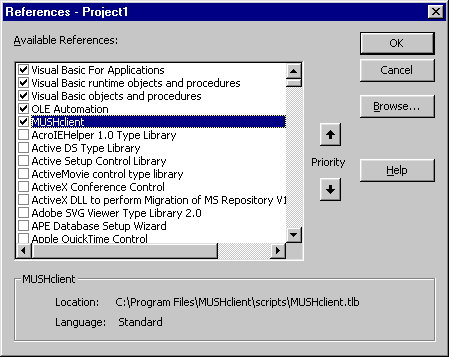
- When the References window opens click on the Browse button and navigate to the "MUSHclient.tlb" file that came as part of the MUSHclient download, then click Open.
- Confirm that "MUSHclient" appears in the list of "Available References" and is ticked.
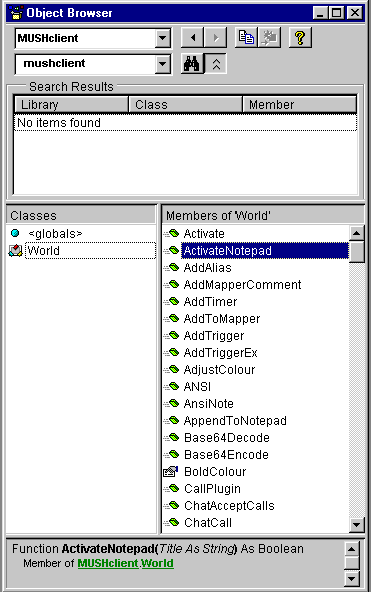
- Open the Object Browser (F2) or use the View Menu -> Object Browser, and change the top combo-box to "MUSHclient". You will see "World" appear in the list of classes down the bottom of that window. Double-click on World and you will see all the supported world functions (eg. AddAlias, AddTimer and so on). Close the browser.
- In the code window for the project type in a test subroutine:
Sub TestNote(theworld As World)

theworld.Note "This is a test"

End Sub
- Go to the File menu and click on Save Project. Accept the suggested file names (MC_callback.vbp and MC_class.cls).
- Go to the File menu and click on "Make MC_callback.exe".
The above steps have created a ActiveX file that can be called from MUSHclient.
Testing the ActiveX project
- Start MUSHclient and open a world
- Make sure scripting is active - VBscript language
- Type:
/dim testobject

/set testobject = createobject ("mc_callback.mc_class")

/testobject.TestNote (world)

/set testobject = nothing
- You should see "this is a test" echo on the output window. What the lines above are doing is:
- Making a variable "testobject"
- Assigning to it a reference to the new class "mc_callback.mc_class" from your Visual Basic application
- Calling the "TestNote" subroutine in that class. We pass to it the reference to our current world. The "TestNote" subroutine uses that reference to call "world.note"
- By setting the testobject to "nothing" we release the reference to that world
This is just an example program. However once you have it working you can expand it somewhat. For instance, you could store the "world" reference in a global variable and use it later on for other subroutine calls without having to pass it down every time.
Alright, that worked quite well and has me well on the way with what I'm doing. However I've come accross another stumbling block which confounds me. If I, in my external form called fromt he ActiveX control, click a button, I want this to interact with the world (send text, do a world.note, create/delete triggers, etc). I just can't seem to do this. Any ideas? (HAving data sent from triggers and variablse TO the form works great though, and I'm happy for that!)
Once you have the "world" variable stored somewhere (eg. in a global variable) then you should be able to do things like:
theworld.send "say hi there"
theworld.send "say hi there"
As I'm only a 'hobby' programmer (much less than yourself). I unfortunately haven't a clue what I'm doing at this point and have no idea how to create or store within a global Variable (not that I'm asking you to teach me, I rather like you working on the client itself heh.) Thanks for all the help so far though!
Just to help you get your VB-based program going, here is an example of what I am talking about.
In the code window (in VB) replace my earlier example with the following. You will note that I am saving the "world" variable into a "public" variable, that will persist between calls. then you can do (in MUSHclient):
This will say "Hi there" to the previously-saved world.
New lines are in bold.
In the code window (in VB) replace my earlier example with the following. You will note that I am saving the "world" variable into a "public" variable, that will persist between calls. then you can do (in MUSHclient):
/testobject.Anothertest
This will say "Hi there" to the previously-saved world.
New lines are in bold.
Public savedworld As World

Sub TestNote(theworld As World)
theworld.Note "This is a test"
Set savedworld = theworld ' save variable
End Sub

Sub AnotherTest()
If Not savedworld Is Nothing And Not IsEmpty(savedworld) Then
  savedworld.Send "say Hi there!"
End If
End Sub
Ok, i have a little silly question :)
Lets say i make a program in Vbasic, and want to communicate with mushclient.
DO i have to communicate with an "active x exe" prementioned, then into MUSH, or can I Integrate these together? If it's possible could you please post some snippets of code just showing the jist of it :)
Thankye everyone
Lets say i make a program in Vbasic, and want to communicate with mushclient.
DO i have to communicate with an "active x exe" prementioned, then into MUSH, or can I Integrate these together? If it's possible could you please post some snippets of code just showing the jist of it :)
Thankye everyone
I'm not totally sure I understand this question. An "ActiveX exe" is a program, so it is not a question of making one or the other.
Basically, i was having trouble putting the class file into a standard exe (it kept turning private or something), so i was wondering how to get a VB form to interact with the COM interface and then send to mushclient... Hope that helps :)
A bit depends on where you want the "conversation" to begin. Do you want MUSHclient to get the external app to do something, or the external app to get MUSHclient do to something?
Can you give a brief example?
Can you give a brief example?
ok, if you could just show how i can make a button to send "test" to mushclient as a world.note on the button click, I should be able to work it all out from there....
I know that this thread is kind of old, but...
In Nick's post:
/dim testobject
/set testobject = createobject ("mc_callback.mc_class")
/testobject.TestNote (world)
/set testobject = nothing
What exactly is passed on to mc_callback as 'world'? Is it possible to hardcode that value in the VB project without having to originate it in Mushclient? I am trying to make a millisecond timer which involves using a script component (.wsc file) but I can't seem to work out how to use callbacks in mushclient.tlb. I actually haven't managed to even reference the .tlb in the script component yet, but I am hoping to do that sooner or later, though it appears that registering that .tlb is somewhat problematic - unless the main problem is myself :)
In Nick's post:
/dim testobject
/set testobject = createobject ("mc_callback.mc_class")
/testobject.TestNote (world)
/set testobject = nothing
What exactly is passed on to mc_callback as 'world'? Is it possible to hardcode that value in the VB project without having to originate it in Mushclient? I am trying to make a millisecond timer which involves using a script component (.wsc file) but I can't seem to work out how to use callbacks in mushclient.tlb. I actually haven't managed to even reference the .tlb in the script component yet, but I am hoping to do that sooner or later, though it appears that registering that .tlb is somewhat problematic - unless the main problem is myself :)
The "world" reference is the actual address of the relevant MUSHclient world in memory. Since COM is an Object management system (hence the O) it deals in object (executable code). You can't "remember" it, the address will be different every time.
As for the .tlb file, I doubt you can use it in a script, it is for if you are writing a program in full Visual Basic. In that case it isn't necessary, just helpful. Here is an example. If you start up VB and open a new project, and then go to the Project menu > References, you can click the Browse button, and use that to add the mushclient.tlb file. After you do that you should see something like this:
Once you have done that then you can use the object browser in your project, and it will show you the names of all the MUSHclient script functions, and also hopefully auto-complete the names and arguments if you happen to use a MUSHclient world in your program ...
Seems like you can use the .tlb in a script afterall. I am talking about 'script components' here (.wsc file) not regular scripts. I initially tried to <reference> the .tlb by registering it with Windows, but although the reference was excepted when I installed the component, it refused to link during runtime. But when I saw 'Mushclient.World' at the bottom of the last VB window you posted, I suddenly had an idea... I tried it another way - I added a TypeLib parameter to the Mushclient.World key in the registry and hooked it to the .tlb's key I created earlier, then I used the <object> tag to add Mushclient.World to the component in hopes that Windows will recognize the reference to the .tlb in the registry. Which it finally did and I actually got to communicate with Mushclient from a script component instantiated from a completely different process than the one Mushclient's script runs in. Hooray! The only problem now is that when I try to do world.anything in the script component, Mushclient attempts to create a new world. I am hoping to find a way around that also though, will see what can be done.
Here's what I actually did:
1. Mushclient script .Run's a standalone script (.wsf)
2. .wsf creates an instance of a .wsc component
3. .wsc component uses callbacks to talk to Mushclient (to grab the timer's parameters and send a command to it when the timer fires).
The reason for using a separate script is to gain access to the Wscript object and avoid hanging Mushclient when I use Wscript.Sleep.
Here's what I actually did:
1. Mushclient script .Run's a standalone script (.wsf)
2. .wsf creates an instance of a .wsc component
3. .wsc component uses callbacks to talk to Mushclient (to grab the timer's parameters and send a command to it when the timer fires).
The reason for using a separate script is to gain access to the Wscript object and avoid hanging Mushclient when I use Wscript.Sleep.
Most likely reason for your problem is that your scripting object has no clue what 'world' it is trying to talk to. The '(theworld AS WORLD)' in Nick's example is a handle. Like the handles created for a window, such a handle will have a number in it that uniquely identifies the world in Mushclient. However since this number depends on any number of factors, including the order in which worlds where opened, etc. you can't hard code it into a program. This means that you need to do something like:
1. Create a wsf instance and pass it the 'world' handle.
2. Have the wsf create an instance of the .wsc.
3. Pass the world handle again to the new object so it knows what world it needs to talk to.
Looks like you hae either missed the last one or are doing it wrong and Mushclient is 'fixing' the problem by spawning a brand new world each time you execute a command. However, unless you specific gave it a value, the handle you are passing is likely EMPTY and I doubt Mushclient is setting it for you.
One 'possible' fix, assuming I am right, would be to do:
dim whandle as WORLD
whandle = whandle.getworld
however, this would only work for 'new' worlds, not existing ones. Actually I am not sure it would work at all, so... lol But I am sure that your .wsc has no clue 'which' world it is supposed to talk to and that is causing the problem.
1. Create a wsf instance and pass it the 'world' handle.
2. Have the wsf create an instance of the .wsc.
3. Pass the world handle again to the new object so it knows what world it needs to talk to.
Looks like you hae either missed the last one or are doing it wrong and Mushclient is 'fixing' the problem by spawning a brand new world each time you execute a command. However, unless you specific gave it a value, the handle you are passing is likely EMPTY and I doubt Mushclient is setting it for you.
One 'possible' fix, assuming I am right, would be to do:
dim whandle as WORLD
whandle = whandle.getworld
however, this would only work for 'new' worlds, not existing ones. Actually I am not sure it would work at all, so... lol But I am sure that your .wsc has no clue 'which' world it is supposed to talk to and that is causing the problem.
I think this was mentioned a while back.
If you try to CreateObject ("mushclient.world") or something similar, then MUSHclient tries to create a new world (as asked). The safer thing, which it sounds like you are doing is to get MUSHclient to create your script object, not your script object to create MUSHclient.
If you try to CreateObject ("mushclient.world") or something similar, then MUSHclient tries to create a new world (as asked). The safer thing, which it sounds like you are doing is to get MUSHclient to create your script object, not your script object to create MUSHclient.