performance problem in AddHotspot

Posted by Fiendish on Thu 23 Jun 2016 06:23 PM — 15 posts, 48,853 views.

USA Global Moderator #0
The code for mouseover detection for a newly added hotspot in WindowAddHotspot is extremely heavy. It loops over so many things and things in things and other things just to find out what hotspot the mouse is actually over and to call a mouseover function on it.
But you already know that the only thing you need to check is the one hotspot that has just been created because nothing else has changed.

I'm reporting this as a bug and not just an oddity because display code for a high density mapper with 11700 rooms showing takes only 0.12 seconds to do all of the multicolor paintbrushed WindowCircleOps without any hotspots, which is fine, .28 seconds to do the same with hotspots included but the mouse far away from the miniwindow, which is just acceptable with the work broken up into chunks, and 6.5 seconds to do the same while the mouse is over the miniwindow, which is extremely painful and unusable.
Amended on Thu 23 Jun 2016 06:30 PM by Fiendish
Australia Forum Administrator #1
What has newly-added got to do with it?

I don't see any loops in AddHotspot.

Quote:

But you already know that the only thing you need to check is the one hotspot that has just been created because nothing else has changed.


Are you saying that hotspot detection, with the mouse over the miniwindow, and there are lots of hotspots, is slow in general?

Can you make up a test case?
Australia Forum Administrator #2
I tested with this alias:


<aliases>
  <alias
   match="hst"
   enabled="y"
   send_to="12"
   sequence="100"
  >
  <send>

win = "test_" .. GetPluginID ()  -- get a unique name, ensure not empty if outside plugin

WindowDelete (win)
WindowCreate (win, 0, 0, 700, 700, miniwin.pos_center_right, 0, ColourNameToRGB("white"))  -- create window
WindowShow (win,  true)  -- show it 


size = 5
offset = 6

function mouseover (flags, hotspot_id)
  SetStatus ("Over " .. hotspot_id)
end -- mouseover 

start = utils.timer ()
for x = 1, 110 do
  for y = 1, 110 do

    WindowRectOp(win, miniwin.rect_frame, x * offset, y * offset, x * offset + size, y * offset + size, 0)

    WindowAddHotspot(win, string.format ("hotspot_x%%d_y%%d", x, y),  
                   x * offset, y * offset, x * offset + size, y * offset + size,   -- rectangle
                   "mouseover", 
                   nil, -- "cancelmouseover", 
                   nil, -- "mousedown",
                   nil, -- "cancelmousedown", 
                   nil, -- "mouseup", 
                   "Click here for fun times",  -- tooltip text
                   miniwin.cursor_hand, 0)  -- hand cursor

  end
end

finish = utils.timer ()

print (string.format ("Took %%0.3f seconds to do that", finish - start))

</send>
  </alias>
</aliases>


Running that takes around 119 milliseconds:


Took 0.119 seconds to do that


That is deleting and re-creating 12100 hotspots. Doesn't seem to be affected if the mouse is over the miniwindow.
Amended on Fri 24 Jun 2016 02:22 AM by Nick Gammon
USA Global Moderator #3
Remove the line calling WindowDelete(win) and try it again.

Now that's an interesting result.
Amended on Fri 24 Jun 2016 04:14 AM by Fiendish
Australia Forum Administrator #4
OK, it's 10 times as slow. Why, I'm not sure unless it is this code:


  // in mouse was over hotspot when it was created, do a "mouse move" to detect this
  if (status == eOK)
    {
    for(POSITION pos=GetFirstViewPosition();pos!=NULL;)
	    {
	    CView* pView = GetNextView(pos);
	    
	    if (pView->IsKindOf(RUNTIME_CLASS(CMUSHView)))
        ((CMUSHView*)pView)->Mouse_Move_MiniWindow (this, m_lastMousePosition);
      } // end of looping through views
    } // end of added hotspot OK


Can you delete all hotspots in your scenario?
Australia Forum Administrator #5
In your test case, are you adding lots of hotspots? Or just deleting and re-adding one?
Australia Forum Administrator #6
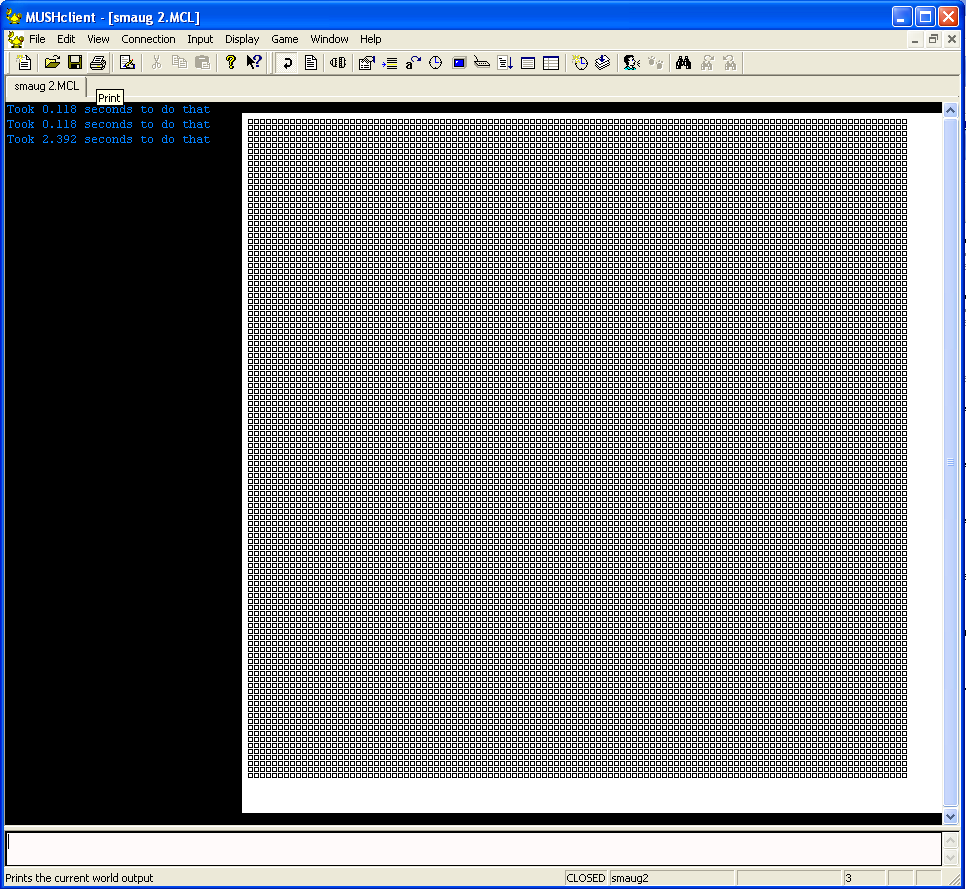
In case anyone is wondering, this is what 12100 hotspots look like:

USA Global Moderator #7
Quick test. In the version of the hst alias without any call to WindowDelete, run it first without your mouse in the miniwindow, then try running it with your mouse in the top left hotspot. And then run it with your mouse in the bottom right hotspot. I get 0.212, 1.1, and 6.3 seconds respectively.

My first thought is that this is because hotspot activity stops looking for callbacks on first hit, which is why we can't overlap hotspots. My second thought is that the search must be happening in reverse order of creation. My third thought is that only the new hotspot is changing, not the mouse or anything else, so there shouldn't be any kind of search happening at all.

I see a similar time effect in my plugin where the closer the mouse is to the middle of the map (where the player is, and where rooms first start being drawn) the longer it takes to complete.

Quote:
In your test case, are you adding lots of hotspots? Or just deleting and re-adding one?

In my plugin I am calling WindowDeleteAllHotspots and then creating 12000 new hotspots. Using WindowDelete+WindowCreate instead of WindowDeleteAllHotspots has some slight improving effect, but is still quite slow in my plugin in a way that doesn't yet seem to be reproduced by your alias. It also introduces some other visual complications that make it painful to change to.

(But in the both cases, why does omitting WindowDelete have any effect at all?)
Amended on Fri 24 Jun 2016 05:10 PM by Fiendish
Australia Forum Administrator #8
I would have to do some profiling to work out exactly where the problem area is. Every a few dozen microseconds, multiplied by 10000, is going to be noticeable.

Quote:

In my plugin I am calling WindowDeleteAllHotspots and then creating 12000 new hotspots.


I don't think offhand that the problem is with a particular hotspot, just that for every AddHotspot some test is taking longer because some initial condition is met (eg. the mouse being over the miniwindow) and that test is then done 10000 times. So it isn't a case of only doing it for the most recent hotspot, it is a case of making the test faster.

Quote:

And then run it with your mouse in the bottom right hotspot. I get 0.212, 1.1, and 6.3 seconds respectively.


I seem to be getting slower response on the RH side in general (X being high) rather than top to bottom per se.
Australia Forum Administrator #9
As a quick test I commented out the code in reply #4 and the time now seems constant. So it is definitely that test that is doing it. And I suspect that the more hotspots that have to be checked (and therefore ruled in/out) the slower it is.

To summarize:

  • When you add a hotspot it fakes a "mouse move" in order to detect if the mouse is now over the new hotspot (and generate the correct function callbacks)
  • If the mouse is not over the miniwindow the test is quick, and takes 30 µs.
  • If the mouse is over an early hotspot in the list, the test is slower and takes 123 µs.
  • If the mouse is over a late hotspot in the list, the test (presumably done more times) is slower again and takes 627 µs.


None of these times are earth-shatteringly slow, however when you do then 12000 times, then you notice the difference.
Amended on Sat 25 Jun 2016 04:40 AM by Nick Gammon
Australia Forum Administrator #10
Fiendish said:

My first thought is that this is because hotspot activity stops looking for callbacks on first hit, which is why we can't overlap hotspots. My second thought is that the search must be happening in reverse order of creation.


The function Mouse_Over_Miniwindow is definitely the one that causes the slowdown. If I comment that out the time is fast. Or - the fact that it gets a match slows things down - I am still experimenting with that.

You can overlap hotspots, and one on top is the one detected.
Australia Forum Administrator #11
I've added an optimization:

https://github.com/nickgammon/mushclient/commit/bd54a9d

This seems to help with my test case.
Australia Forum Administrator #12
There may be side-effects. I suggest you keep an eye on the behaviour when you test it. Basically what the test does is only do the time-consuming stuff if we think the cursor is over the newly-added hotspot. So if you are adding 10000 hotspots, the lower-level tests will be done once, not 10000 times.
USA Global Moderator #13
Nick Gammon said:

There may be side-effects.

I can't think of any scenario that would cause one given that it looks you still loop on an actual match. So conceivably if you were going to do cancelmouseout on an underneath hotspot it'd still happen.
Australia Forum Administrator #14
Agreed. But bugs have a way of subtly introducing themselves. :)

I suggest you test extensively before deploying.