Just thought I’d show what I’ve done that might be of interest for the G-Pascal forum.
Attached is a G-Pascal 3.1 virtual floppy disk gp5.d64
http://www.gammon.com.au/GPascal/gp5.d64
On this disk I have written 3 programs in G-Pascal:
Sine Wave
GPascal2Text
Text2GPascal
What I have enabled here is that anyone can use say Microsoft Word to edit a GPascal program. Once they are ready to try it in GPascal all that is required is to do a Save-As text and call the program PCTEXT.
The file needs to have the extension changed from .txt to .prg which is easy to do using Windows Explorer.
Then using a utility program that can open Commodore 64 .D64 files (I use D64 Editor which is free on the net with optional donation at http://www.d64editor.com/), import the PCTEXT.PRG file onto any GPascal .D64 virtual floppy disk file.
When you fire up that copy of G-Pascal and check the catalogue, you should see the PCTEXT.PRG file on the directory.
Then just load, compile and run the program TEXT2GPASCAL which will read into memory the program text, converting to PET ASCII and terminates with CR NUL (the marker for the end of the file) in memory. This enables the program just loaded to be listed or saved as a Tokenized G-Pascal program on the same disk.
I also wrote GPASCAL2TEXT that does this in reverse. The text file it creates has line numbering for ease of reading. In Microsoft Word it’s easy to strip off the leading line numbers using ALT when left mouse click and drag over the leading characters (note: use Courier New as the font so that all the text is fixed width for this trick to work). This is also good if one gets hold of other Pascal files from the net or after scanning and OCR (which is also a method I have used to turn paper listings back into real text programs, like the Detokenize program also on the attached GP5.D64 disk).
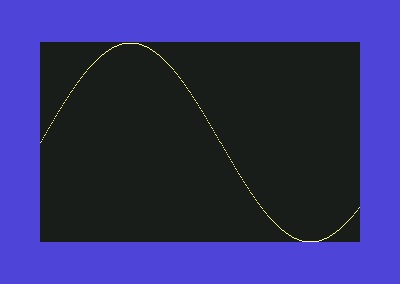
I then decided to try to write a program that would draw a sine wave in hi res on the screen. I discovered that G-Pascal does not have any SIN TAN or COS nor can it handle floating point numbers. But, as you can see in the program, I found a suitable approximation formula (Bhaskara) and simply returned the results 100 times in value. This was enough resolution as I was plotting to a screen of only 200 pixels high and 320 pixels wide. Here is a screen shot of the Sin Wave from the program (first written in MS Word, then imported into G-Pascal using the above programs). I know the editor in G-Pascal is great but I just thought I’d add this option for those who want to work with their PC keyboard and PC fonts, etc.
http://www.gammon.com.au/images/G-Pascal_sine_wave_image.jpg
The Sine Wave function I created got me thinking that if someone had the time, a library of trigonometry formulas might be handy if anyone is needing this for any G-Pascal retro programming. Just a thought.
Note: If going the other way (i.e. using GPascal2Text) any utility that has an Export of a file from within the .D64 'floppy' will deliver a text file in standard ASCII that can be opened in any editor like MSWORD.
Attached is a G-Pascal 3.1 virtual floppy disk gp5.d64
http://www.gammon.com.au/GPascal/gp5.d64
On this disk I have written 3 programs in G-Pascal:
Sine Wave
GPascal2Text
Text2GPascal
What I have enabled here is that anyone can use say Microsoft Word to edit a GPascal program. Once they are ready to try it in GPascal all that is required is to do a Save-As text and call the program PCTEXT.
The file needs to have the extension changed from .txt to .prg which is easy to do using Windows Explorer.
Then using a utility program that can open Commodore 64 .D64 files (I use D64 Editor which is free on the net with optional donation at http://www.d64editor.com/), import the PCTEXT.PRG file onto any GPascal .D64 virtual floppy disk file.
When you fire up that copy of G-Pascal and check the catalogue, you should see the PCTEXT.PRG file on the directory.
Then just load, compile and run the program TEXT2GPASCAL which will read into memory the program text, converting to PET ASCII and terminates with CR NUL (the marker for the end of the file) in memory. This enables the program just loaded to be listed or saved as a Tokenized G-Pascal program on the same disk.
I also wrote GPASCAL2TEXT that does this in reverse. The text file it creates has line numbering for ease of reading. In Microsoft Word it’s easy to strip off the leading line numbers using ALT when left mouse click and drag over the leading characters (note: use Courier New as the font so that all the text is fixed width for this trick to work). This is also good if one gets hold of other Pascal files from the net or after scanning and OCR (which is also a method I have used to turn paper listings back into real text programs, like the Detokenize program also on the attached GP5.D64 disk).
I then decided to try to write a program that would draw a sine wave in hi res on the screen. I discovered that G-Pascal does not have any SIN TAN or COS nor can it handle floating point numbers. But, as you can see in the program, I found a suitable approximation formula (Bhaskara) and simply returned the results 100 times in value. This was enough resolution as I was plotting to a screen of only 200 pixels high and 320 pixels wide. Here is a screen shot of the Sin Wave from the program (first written in MS Word, then imported into G-Pascal using the above programs). I know the editor in G-Pascal is great but I just thought I’d add this option for those who want to work with their PC keyboard and PC fonts, etc.
http://www.gammon.com.au/images/G-Pascal_sine_wave_image.jpg
The Sine Wave function I created got me thinking that if someone had the time, a library of trigonometry formulas might be handy if anyone is needing this for any G-Pascal retro programming. Just a thought.
Note: If going the other way (i.e. using GPascal2Text) any utility that has an Export of a file from within the .D64 'floppy' will deliver a text file in standard ASCII that can be opened in any editor like MSWORD.