I've been searching through google and such and found a gmcp plugin for Imperian but I can't download it. Is there any helps available on how to go about reading gmcp information?
GMCP and Lusternia
Posted by Dyron on Mon 11 Feb 2013 08:16 PM — 15 posts, 48,009 views.
Here?
https://github.com/druuimai/gmcp.plugin
https://github.com/druuimai/gmcp.plugin
Awesome, thanks Nick. GMCP is a lot more complicated in mush for some reason. One last question, I hope.
How do I do a gmcp check on char.vitals.momentum by using that?
How do I do a gmcp check on char.vitals.momentum by using that?
See this thread:
http://www.gammon.com.au/forum/bbshowpost.php?id=11549
You may be able to ask one of the people there, who use GMCP on Imperian, how they did it.
http://www.gammon.com.au/forum/bbshowpost.php?id=11549
You may be able to ask one of the people there, who use GMCP on Imperian, how they did it.
You could try doing this:
Download the GMCP handler from Aardwolf:
http://www.aardwolf.com/wiki/index.php/Clients/MushclientGMCP
Copy two files as documented on that page:
Install the GMCP_handler into MUSHclient.
Close the world (if necessary) and reconnect.
You should see:
Type:
Look around. You should see something like:
Now to do something useful with that. You can turn the debugging off:
In the Immediate window, enter:
That calls the plugin, asking for the latest "Char" stats. We see in the output window:
The last line shows how we pulled out our current HP from the table.
To get the room details:
Example output:
You should be able to build on that to use this information usefully.
Download the GMCP handler from Aardwolf:
http://www.aardwolf.com/wiki/index.php/Clients/MushclientGMCP
Copy two files as documented on that page:
- gmcphelper.lua to the "lua" directory in the MUSHclient installation
- GMCP_handler.xml to the "plugins" directory
Install the GMCP_handler into MUSHclient.
Close the world (if necessary) and reconnect.
You should see:
--- Connected on Tuesday, February 12, 2013, 10:45 AM ---
Enabling GMCP.
Rapture Runtime Environment v2.2.0 -- (c) 2012 -- Iron Realms Entertainment
Type:
gmcpdebug 2
Look around. You should see something like:
Char.Vitals { "hp": "340", "maxhp": "340", "mp": "334", "maxmp": "334", "ep": "600", "maxep": "600", "wp": "570", "maxwp": "570", "nl": "0", "bal": "1", "eq": "1", "string": "H:340/340 M:334/334 E:600/600 W:570/570 NL:0/100 " }
gmcpdata serialized: {
  Char = {
    Status = {
      pk_level = "1   (0%)",
      guild = "(None)",
      bash_level = "1   (0%)",
      towne = "(None)",
      sect = "(None)",
      name = "Haelanad",
      city = "(None)",
      prof = "(None)",
      level = "1   (0.00%)",
      quest_level = "1   (0%)",
      fullname = "Haelanad",
      },
    Vitals = {
      wp = "570",
      eq = "1",
      ep = "600",
      maxhp = "340",
      hp = "340",
      nl = "0",
      maxep = "600",
      maxmp = "334",
      mp = "334",
      maxwp = "570",
      bal = "1",
      string = "H:340/340 M:334/334 E:600/600 W:570/570 NL:0/100 ",
      },
    StatusVars = {
      pk_level = "PK level",
      guild = "Guild",
      bash_level = "Bashing level",
      towne = "Towne",
      sect = "Cult/Sect",
      name = "Name",
      city = "City",
      prof = "Prof",
      level = "Overall level",
      quest_level = "Questing level",
      fullname = "Full name",
      },
    },
  Room = {
    Info = {
      map = "www.imperian.com/irex/maps/clientmap.php?map=1&building=0&level=0 6 13",
      num = "8465",
      name = "The empty western square",
      environment = "Urban",
      details = {
        },
      coords = "1,-1,0,0",
      exits = {
        ne = "8472",
        s = "8453",
        e = "8463",
        d = "8558",
        w = "8477",
        ["in"] = "28383",
        se = "8453",
        sw = "8571",
        n = "8472",
        },
      area = "the ruins of Caanae",
      },
    WrongDir = {
      [1] = "n",
      },
    },
  }
-
Now to do something useful with that. You can turn the debugging off:
gmcpdebug 0
In the Immediate window, enter:
res, gmcparg = CallPlugin ("3e7dedbe37e44942dd46d264","gmcpval","Char")

-- convert to Lua table
luastmt = "gmcpdata = " .. gmcparg
assert (loadstring (luastmt or "")) ()

-- display Lua table
tprint (gmcpdata)

print ("My HP are:", gmcpdata.Vitals.hp)
That calls the plugin, asking for the latest "Char" stats. We see in the output window:
"Status":
  "pk_level"="1   (0%)"
  "guild"="(None)"
  "bash_level"="1   (0%)"
  "towne"="(None)"
  "sect"="(None)"
  "name"="Haelanad"
  "quest_level"="1   (0%)"
  "prof"="(None)"
  "level"="1   (0.00%)"
  "city"="(None)"
  "fullname"="Haelanad"
"Vitals":
  "wp"="570"
  "eq"="1"
  "ep"="600"
  "maxhp"="340"
  "hp"="340"
  "nl"="0"
  "maxep"="600"
  "maxmp"="334"
  "mp"="334"
  "maxwp"="570"
  "string"="H:340/340 M:334/334 E:600/600 W:570/570 NL:0/100 "
  "bal"="1"
"StatusVars":
  "pk_level"="PK level"
  "guild"="Guild"
  "bash_level"="Bashing level"
  "towne"="Towne"
  "sect"="Cult/Sect"
  "name"="Name"
  "quest_level"="Questing level"
  "prof"="Prof"
  "level"="Overall level"
  "city"="City"
  "fullname"="Full name"
My HP are: 340
The last line shows how we pulled out our current HP from the table.
To get the room details:
res, gmcparg = CallPlugin ("3e7dedbe37e44942dd46d264","gmcpval","Room")

-- convert to Lua table
luastmt = "gmcpdata = " .. gmcparg
assert (loadstring (luastmt or "")) ()

-- display Lua table
tprint (gmcpdata)

print ("The current room is:", gmcpdata.Info.name)
Example output:
"Info":
  "map"="www.imperian.com/irex/maps/clientmap.php?map=1&building=0&level=0 6 13"
  "num"="8465"
  "name"="The empty western square"
  "environment"="Urban"
  "details":
  "coords"="1,-1,0,0"
  "exits":
    "ne"="8472"
    "s"="8453"
    "e"="8463"
    "d"="8558"
    "w"="8477"
    "in"="28383"
    "se"="8453"
    "sw"="8571"
    "n"="8472"
  "area"="the ruins of Caanae"
"WrongDir":
  1="n"
The current room is: The empty western square
You should be able to build on that to use this information usefully.
And, look! If you download the GMCP mapper from here:
You can get a nice mapper going, like this:
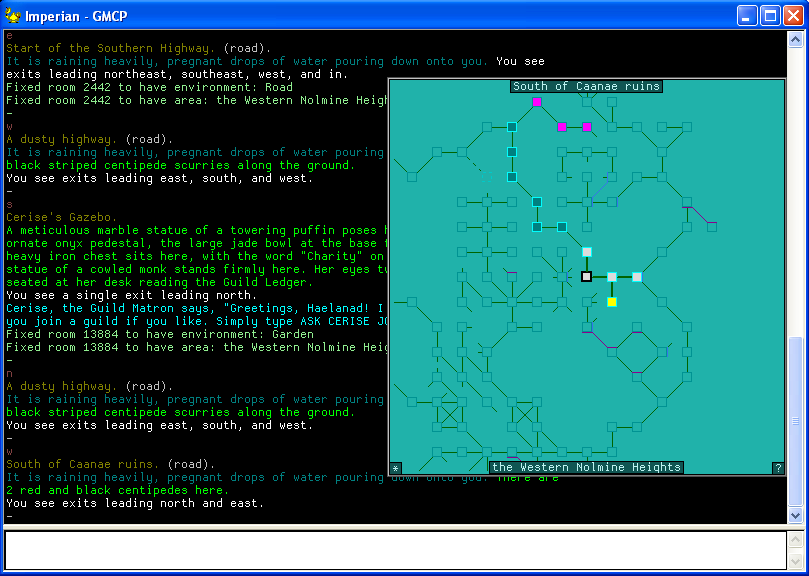
https://sites.google.com/site/dontarion/gmcp_mush_mapperYou can get a nice mapper going, like this:
Took a bit of editing but got it figured out. Thanks a ton, Nick.
	-- Gmcp call
	res, gmcparg = CallPlugin ("3e7dedbe37e44942dd46d264","gmcpval","Char")
	-- convert to Lua table
	luastmt = "gmcpdata = " .. gmcparg
	assert (loadstring (luastmt or "")) ()
	-- Set momentum variable
	local momentum = tonumber(gmcpval("Vitals.momentum"))
	Note ( "Momentum is: " .. momentum )
Should I put this inside the function I'm wanting to use or just in the main script file?
You put that into the script at the point where you want to know the momentum.
I couldn't see momentum in the list I posted above, but perhaps you do?
I couldn't see momentum in the list I posted above, but perhaps you do?
Lusternia has different gmcp then the mud you tried. It has char.vitals.momentum and char.vitals.power that I'm trying to access
Oh sorry, I saw Imperian in your first post and tried that.
You didn't exactly copy my earlier example did you?
This shows your momentum and hit points:
This shows your momentum and hit points:
-- Gmcp call
res, gmcparg = CallPlugin ("3e7dedbe37e44942dd46d264","gmcpval","Char")
-- convert to Lua table
luastmt = "gmcpdata = " .. gmcparg
assert (loadstring (luastmt or "")) ()
-- Set momentum variable
local momentum = tonumber(gmcpdata.Vitals.momentum)
Note ( "Momentum is: " .. momentum )
local hp = tonumber(gmcpdata.Vitals.hp)
Note ( "HP is: " .. hp)
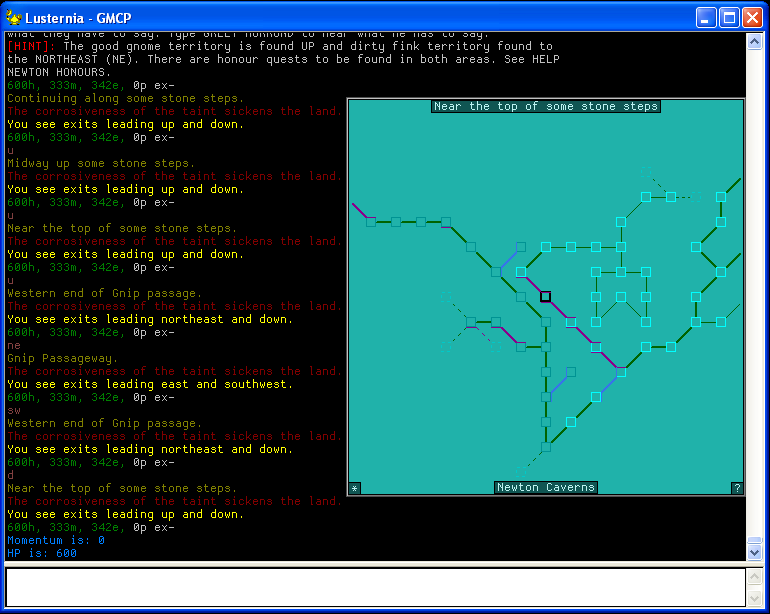
The good news is the mapper works with Lusternia as well, here is an example (momentum and HP shown at the bottom):
You can query the mapper for things:
mapper find teacher

The Path of the Teacher (road) (141) - 6 rooms away
The Path of the Teacher (road) (140) - 7 rooms away
The Path of the Teacher (road) (139) - 8 rooms away
The Path of the Teacher (road) (138) - 9 rooms away
The Path of the Teacher (road) (137) - 10 rooms away
The Path of the Teacher (road) (136) - 11 rooms away
The Path of the Teacher (road) (135) - 12 rooms away
The Path of the Teacher (road) (134) - 13 rooms away
The Path of the Teacher (road) (133) - 14 rooms away
The Path of the Teacher (road) (132) - 15 rooms away
The Path of the Teacher (road) (131) - 16 rooms away
The Path of the Teacher (road) (130) - 17 rooms away
Yea, I had it all working. Just wasn't sure if I should put it in the function or not. It was working fine in the function. Thanks, Nick.