To start out with, I posted this in the wrong place and have no idea how to remove it, so I just posted it again in the right place. Sorry!
Hello,
I am a new Mud player so bear with me. MushClient is the second client I've used and while it doesn't offer some of the things I'd gotten used to on the other one (well, it probably offers them and I'm not savvy enough to figure out how to set it up), it gives me everything I need for the most part.
I've been reading random forum posts all day and it's a jumple of terms and codes that confuse the hell out of me, but I have a question. If I'm to understand correctly, running a "bot" is setting a timer to repeat while you're character is doing something that gets them xp. Please clarify if I'm wrong.
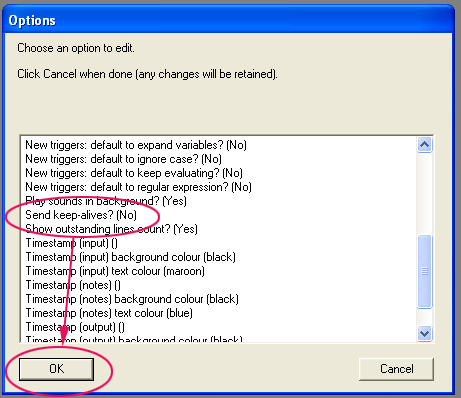
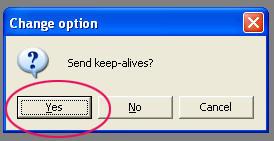
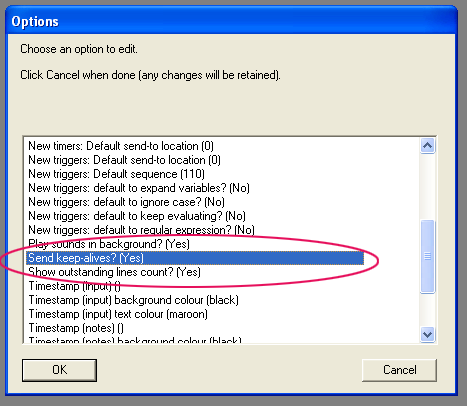
I need for Mushclient to stop disconnecting to the world I'm in when I sleep and I think I need to set up a "bot". My character is in a relationship IC. They have a home together and when she(I) goes to sleep, he makes sure to be home to tuck her in, by the time he gets home, the game has been disconnected and her (my) fiance has to go to bed alone. But when she wakes up, he's curled up in the bed next to her.
I've tried timers and within max time 1 hour 24 minutes, I've been disconnected. I do simple things like check my health, list my stats, look in the room, nothing that would get me xp because I just want her to be in the bed when he gets home, so his character can crawl in bed and when I wake up in the morning, I don't have to relog her in. I tried 5 timers at various times and it still happens. Is there either a) an auto disconnect button I'm missing somewhere? or b) am I setting my timers wrong? Mind you, most people "sleep" in game, which I think is part of the reason you can buy homes IC, but my character can't "sleep" in game for more than an hour and a half before I'm disconnected. Help?
Hello,
I am a new Mud player so bear with me. MushClient is the second client I've used and while it doesn't offer some of the things I'd gotten used to on the other one (well, it probably offers them and I'm not savvy enough to figure out how to set it up), it gives me everything I need for the most part.
I've been reading random forum posts all day and it's a jumple of terms and codes that confuse the hell out of me, but I have a question. If I'm to understand correctly, running a "bot" is setting a timer to repeat while you're character is doing something that gets them xp. Please clarify if I'm wrong.
I need for Mushclient to stop disconnecting to the world I'm in when I sleep and I think I need to set up a "bot". My character is in a relationship IC. They have a home together and when she(I) goes to sleep, he makes sure to be home to tuck her in, by the time he gets home, the game has been disconnected and her (my) fiance has to go to bed alone. But when she wakes up, he's curled up in the bed next to her.
I've tried timers and within max time 1 hour 24 minutes, I've been disconnected. I do simple things like check my health, list my stats, look in the room, nothing that would get me xp because I just want her to be in the bed when he gets home, so his character can crawl in bed and when I wake up in the morning, I don't have to relog her in. I tried 5 timers at various times and it still happens. Is there either a) an auto disconnect button I'm missing somewhere? or b) am I setting my timers wrong? Mind you, most people "sleep" in game, which I think is part of the reason you can buy homes IC, but my character can't "sleep" in game for more than an hour and a half before I'm disconnected. Help?