Version 4.62 of MUSHclient has a new Lua utility: utils.filterpicker.
This lets you supply a lengthy list of items you might want the player to pick from, and lets you filter the list down, in exactly the same way that the "function list" dialog works (it is the same dialog box).
You initially supply a table of items you want the player to see, with corresponding keys. For example, a room description could be what you see, and the internal room number could be the key.
Or it might be a list of spells, or quests, or something like that.
Then the player can filter down (eg. by typing in "fire" for fire spells, or "cave" for rooms with "cave" in the name). Then they choose which one, which is returned to the calling function. That could then be used to speedwalk to that room, or take other appropriate action.
The calling sequence is:
The only required argument is the table of choices (t).
For example, using one of my mapping databases to generate room names and room numbers:
With no filter selected I see something like this:

And if I type "hidden" into the filter field I see this:

If I choose a room I see this:
This lets you supply a lengthy list of items you might want the player to pick from, and lets you filter the list down, in exactly the same way that the "function list" dialog works (it is the same dialog box).
You initially supply a table of items you want the player to see, with corresponding keys. For example, a room description could be what you see, and the internal room number could be the key.
Or it might be a list of spells, or quests, or something like that.
Then the player can filter down (eg. by typing in "fire" for fire spells, or "cave" for rooms with "cave" in the name). Then they choose which one, which is returned to the calling function. That could then be used to speedwalk to that room, or take other appropriate action.
The calling sequence is:
result = utils.filterpicker (t, title, initial_filter )
The only required argument is the table of choices (t).
- t - table of key/value pairs
- title = title of box - if nil, defaults to "Filter" (max 100 characters)
- initial_filter = initial filter value - defaults to no filter
For example, using one of my mapping databases to generate room names and room numbers:
db = assert (sqlite3.open ("/Program Files/mushclient/achaea.com_23.db" ))

t = {}

for row in db:nrows ("SELECT uid, name FROM rooms") do
  t [row.uid] = row.name
end

result = utils.filterpicker (t, "Choose room")

if result then
  print ("You chose key", result, "which is", t [result])
else
  print "Nothing chosen"
end -- if

db:close ()
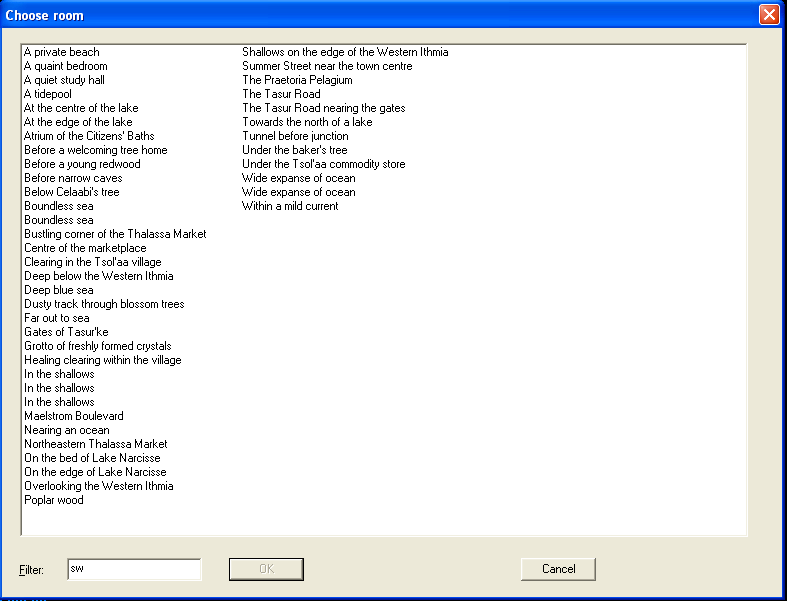
With no filter selected I see something like this:
And if I type "hidden" into the filter field I see this:
If I choose a room I see this:
You chose key 24931 which is A bend in the shallow marsh