This page can be quickly reached from the link: http://www.gammon.com.au/security
The Lua sandbox - and trusting plugins
After lengthy discussion[1] the "Lua sandbox" in MUSHclient is going to be made less intrusive, from version 4.57 onwards.
The sandbox was intended to make it harder for malicious scripts to do harmful things to your PC (like, create viruses, delete files, etc.). However the problem with it has been twofold:
- It only affects Lua, so people could, if they wanted, do those things in other script languages, like VBscript.
- It made it hard for script-writers to do useful things (like read configuration files), because the sandbox would stop them.
The changes in version 4.57 will only affect new installations of MUSHclient. The instructions below describe how to make similar changes to existing installations.
How to disable the Lua sandbox
- Open MUSHclient and go to the File menu -> Global Preferences (Ctrl+Alt+G)
- Click on the Lua tab
- In the big box (Preliminary code) RH-click, and choose "Select All".
- Hit the Delete key to delete everything.
- Type in at least two hyphens (which is a comment in Lua) otherwise MUSHclient will put the default sandbox back. You could enter, for example:
-- Empty sandbox
- Check the checkbox "Allow DLLs to be loaded"
- Click OK to save the changes
Your changes should look like this:

How do you know who to trust?
With the sandbox disabled you are slightly at more risk from malicious plugins. As I said earlier, anyone who wants to can simply not use Lua, so the risk isn't much greater.
However, regardless of the script language, there are some steps you can take to stay reasonably safe.
The main rule is to only install plugins from trusted plugin-writers.
Trusted plugins would generally meet one or more of the following conditions:
- Plugins distributed with MUSHclient itself (if MUSHclient was downloaded from the mushclient.com web site)
- Plugins distributed from my GitHub plugins site:
http://github.com/nickgammon/plugins
- Plugins downloaded from the plugins page on this site:
http://mushclient.com/mushclient/plugins/
- Plugins mentioned at the top of the plugins forum page:
http://mushclient.com/scripts/forum.php?bbtopic_id=108
- Plugins suggested by your MUD on their main web pages (not just a forum page but a page operated by the MUD themselves). Presumably they are only recommending trusted plugins.
- Plugins found on this forum, by a forum poster who has made many (like, over 100) postings. Such forum posters are generally trusted and well-regarded. Each forum posting tells you how many posts that person has made, like this:
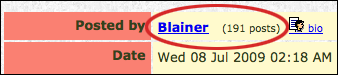
In this case we see that Blainer has made 191 posts, so he can probably be trusted.
- As a double-check, go to the main forum page (http://mushclient.com/forum/), scroll down to the bottom, and check when that person joined the forum. For example:
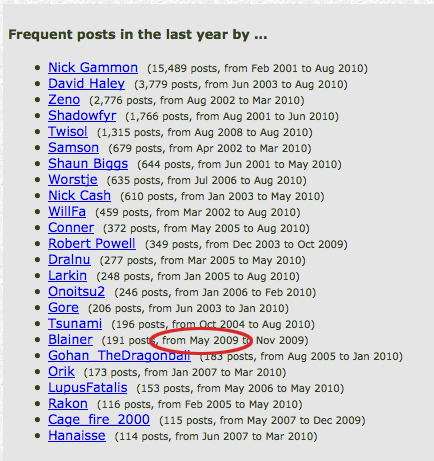
We see that Blainer joined the forum over a year ago.
Only people who have made more than 100 posts show up on that list. Another approach is to click on their "bio" (as in the screenshot above) and check when they joined the forum. So someone who had made 80 posts, and joined over a year ago, is probably safe to trust.
- Posts by Nick Gammon (the author of MUSHclient) (that is, me). Such posts pass the previous two tests anyway, as I am a frequent poster on the forum.
Plugins to be wary of
If someone suggests you install something that looks like the following, I would be very wary:
- An in-game whisper to download some "new cool feature" that does not send you to the mushclient.com forum or web site
- Anything that needs you to run an executable (ie. MyGreatMapper.exe). Note that plugins are XML files (eg. mapper.xml) not executable files.
- Anything that includes a DLL file (eg. mapper.dll). DLLs can execute arbitrary code (eg. viruses).
- Anything that is supplied in "pre-compiled" form (eg. Lua bytecode) which is not possible to inspect and check for malicious activities, such as deleting files, sending files over the Internet, and so on.
- Anything recommended by someone who joined the forum recently (like, in the last few days)
- Anything recommended by someone who has only made a handful of forum postings.
- Anything recommended by someone who does not exist on this forum here at all.
- Anything from someone claiming to be someone trusted (eg. Nick Gammon) but which takes you to some other web site than this one.
- Anything that requires you to login to some external web site (to "verify" who you are).
- Be cautious of plugins which are inside .zip files. In particular you should only need to unzip the archive, not automatically run anything inside it.
Note that some plugin writers (Twisol is an example) have developed a plugin directory structure which uses .zip files.
If a trusted plugin writer (who meets the conditions earlier in this post) needs you to unzip a .zip file, or use a .dll file, this should be OK.
The use of .zip files, .dll files, or .exe files is a "red flag" for unknown plugin writers.
This web site (http://mushclient.com/) never asks people to login to "verify" their account information. Either you can login to the forum (http://mushclient.com/forum/) or you can't. There is no other verification procedure.
Sandbox discussion
1. http://mushclient.com/forum/?id=10497