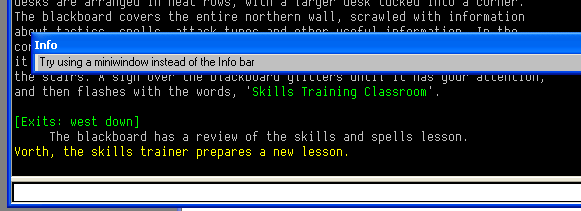
Somehow, the side thingy on my MUSHclient stretched out across the screen, leaving about a half inch strip for windows. I cannot find anyway to move it. Hard to describe so here's a link to a (kinda small) picture.
That happens on accident every so often. It's almost funny sometimes; other times it makes you want to rip your hair out.
Do you see the horizontal strip of darker grey in that big area to the left? Click and drag the leftmost border of it, you should get a sort of fuzzy outline following your mouse. Drag it out of MUSHclient; drop it on your Windows taskbar. It should pop out into its own miniature window, and cause the output window in MUSHclient to become normal again. Then just drag that little grey window below the input bar, and it should fall back into place. The grey bar normally rests against the left side of MUSHclient, so if it's a bit to the right (but still below the output window) when you drop it, you can drag the left side again and move it to the edge.
If that doesn't make sense, let me know and I'll make a picture tutorial.
Right, yeah. I just never thought moving it could actually be considered useful. I'd bet that 95% of MUSHclient's users don't know you can do that, and 99% of those who do know about it prefer it at the bottom. And a good percentage of those who don't know about it probably fall face first into the issue FrozenFlames had.