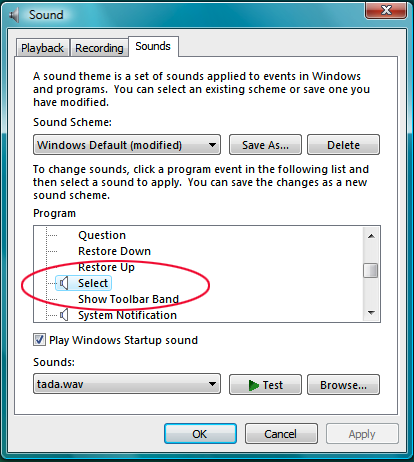
In the plugin dialog, clicking on any of the plugins in the list causes a system chime sound to occur. I'm nearly positive it didn't do this in 4.46 (which I upgraded from).
As an afterthought: Secondly, as a minor annoyance that's been bothering since forever, the Help -> Functions List dialog closes if you double-click on a space not occupied by a list item. It shouldn't do anything if I don't double-click on an item, it should just stay there. Thirdly, the "Filter" input box on the functions list dialog should really automatically get focus when it's opened, so I can just start typing into it right away.
Is the screen using a common control? I recall there used to be a bug with one particular common control of a particular version (which would mean compilation under some old version of VC++) which had a bug in its usage of the PlaySound() routines.
But I don't think the window in question is a treelist, so I'm doubtful it is that.
This is the generic v4.48 build installed via the released installer. I'm using Vista Home Premium 32bit.
I can't reproduce it on my laptop either (same details as above). I would check again on my desktop (where I heard the chime originally), but the screen got busted today, so I won't be using it anytime soon.
I also get the chime sound when clicking on a plugin in the list. I'm using 4.43 and Vista Home Premium, and I believe the chime was there before upgrading to 4.43 from 4.33. That is the only occasion that I get a chime.
I'm back on my desktop (via a wall-mounted TV monitor...), and I continue to get the chime sound. My desktop is currently using v4.48 on Vista Home Premium.
If you do a git diff you see there were absolutely no changes to that dialog box handler between v4.46 and v4.48:
git diff v4.46 v4.48 -- FunctionListDlg.*

(no output)
You didn't point out to me that this isn't the dialog I am looking for. ;) The relevant dialog is PluginsDlg. not FunctionListDlg.*
But no matter, that hasn't changed either.
I tried it on my daughter's Windows Vista PC (using MUSHclient 4.43) and there was no chime or any sound as I selected different plugins ... until:
If you go into Control Panel -> Sounds, and configure the sounds for various actions, if you set a sound for "changed selection" *then* you get a sound in the plugins dialog box because you are, well, changing the selection.
I tried playing around with the system sounds in the control panel. I don't actually have an entry for "changed selection", but it turns out that it is using the sound assigned to "Default Beep" in the Windows group. And it's not just the plugin list, it seems to be all of the list controls: triggers, aliases, variables, etc.
Then I tried a different program that uses a pre-Vista list control, and sure enough it's doing the same thing. This must be something specific to Vista, as I know my list controls didn't ding in XP. Why, why did I ever upgrade???
I can't find any "changed selection" sound in my Sounds controls, either. Hokken is right, also: I get the chiming sounds in the triggers/aliases/etc lists as well.
Exactly, but it didn't have any sound attached (no speaker icon on the left). Clearing the registry key that the article points to solved it, and I do recall having changed one or two options in Sound recently, so that's probably when it happened.
In other words, it is exactly the same bug I referred to in my first post in this topic. ^^; I just lacked a link to the KB article. Gotta love psychic debugging.
Maybe I misremembered the control. It was months ago that I read about it, heh. And it'd be stupid to have the same bug on both controls imo. But yeah, problem solved!